


Good and Evil Comic Book
4.720.00 Reviews
App Specs
- Version
- 2026.6.11
- Updated On
- License
- Free
- Downloads
- 10,000+
- Developer
- No Greater Joy Ministries, Inc.
- Categories
- Comics
- Platform
- Android
Screenshots

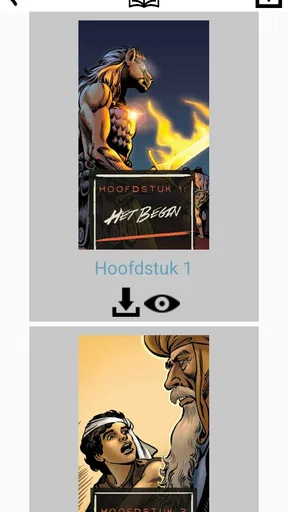

 Analysis by AppCompare
I approached Good and Evil Comic Book expecting a simple digital comic, but its chronological presentation of Bible stories gives it a more practical purpose. Rather than asking me to jump between familiar episodes or read a long block of text, it turns the material into a visual sequence that is easier to follow in short sessions. The app belongs to the Comics category, comes from No Greater Joy Ministries, Inc., and is free to use, which makes it easy to try without treating the download as a major commitment.
What stood out to me is the way the comic format changes the reading experience. The Bible stories are arranged as a connected journey, so I can see how one event leads into another instead of treating each story as an isolated lesson. That makes the app useful for personal reading, family discussion, or introducing someone to the broad shape of the Bible without starting with a dense study edition.
How I used the comic from the first page onward
My most comfortable routine was to read a small portion at a time rather than trying to rush through the entire collection. The app contains over 300 pages, and that is enough material to make a single sitting feel more like a reading session than a quick sample. I found it easier to pause after a scene, think about what had happened, and then continue later with the story still fresh in my mind.
That short-session approach also works well for families. A parent can open the app during a quiet part of the evening, read several pages with a child, and stop at a natural point. Since the content is presented visually, a younger reader can follow the action through the artwork while an older reader adds context. The Everyone 10+ age guidance is a useful signal for families, although adults should still decide whether the treatment of serious biblical events suits a particular child.
I would not describe this as a replacement for a full Bible. Its strength is narrative orientation, not detailed reference work. I used it as a starting point: first following the illustrated sequence, then turning to another Bible resource when I wanted exact wording, broader commentary, or a closer look at a particular passage. That combination keeps the comic approachable without asking it to do a job it was not designed to do.
A realistic everyday use case is a person who wants a few minutes of meaningful reading during a commute, a lunch break, or before bed. The visual panels make it less demanding than opening a long chapter when concentration is limited. At the same time, the chronological structure gives the session a sense of direction. I was not merely browsing unrelated pages; I was moving through a larger story.
Why the chronological order matters
Many Bible apps organize content around books, search tools, daily verses, or topical categories. Those approaches are valuable, but they can leave a newcomer wondering where to begin. Here, the chronological flow provides a built-in route. I did not need to decide whether to start with a particular book or search for a famous episode. The sequence itself became the guide.
Worth Reading Before You Choose

Flipboard Shows What News Apps Must Do Beyond the Feed

Switching to Android Auto Means Rethinking Your Driving Routine

Google Calendar Makes a Crowded Week Easier to Manage

Ludo King Makes the Most of the Minutes Between Plans

Baby Panda World Brings Quick Play to Modern Phones, but Its Game Library Feels Busy

ESPN’s Live Game View Makes Following Close Games Easier
That design is especially helpful when the reader knows individual stories but not their relationship to one another. Seeing them in order can clarify the movement from early events through later ones. It also creates a useful habit: instead of opening the app only when a familiar story comes to mind, I could continue from where I stopped and gradually build a wider understanding.
There is a trade-off, though. A fixed sequence is convenient for beginners, but it is less flexible than a reference app. If I wanted to compare several passages, jump directly to a topic, or investigate a word, a standard Bible app would be faster. Good and Evil works best when I accept its guided reading style rather than expecting a complete study toolkit.
Small habits that make reading easier
I recommend deciding on a stopping point before opening the app. Because the comic is easy to skim, it is tempting to keep moving without absorbing the details. A simple habit is to finish at the end of a scene, summarize what happened in my own words, and only then continue. This turns passive scrolling into active reading.
Another useful approach is to keep a separate note with questions that arise during the session. The comic can introduce an event clearly, but a question about historical background, wording, or interpretation may require another source. Writing the question down prevents the reading flow from becoming a constant search exercise and gives the later study a clear purpose.
For group use, I would let each person choose one panel or moment to discuss. That works better than asking everyone to explain the whole reading at once. The visual structure gives the conversation a shared reference point, while the chronological order helps the group connect the current scene with earlier ones.
Settings and reading choices worth checking
Before settling into regular use, I would spend a moment checking the app’s available reading controls on the device. Even when a comic app is straightforward, screen size, brightness, orientation, and text legibility can change the experience considerably. On a phone, I preferred a comfortable brightness level and a pace that allowed me to inspect each panel instead of rapidly swiping through.
I also found that the best setup depends on the purpose. For private reading, a smaller screen is perfectly workable when I read slowly. For sharing a story with a child or a small group, a larger display is more comfortable because several people need to see the artwork at once. The app’s value is visual, so anything that makes panels difficult to inspect weakens its main advantage.
Readers should also think about attention rather than only convenience. Notifications and interruptions can make a short comic session feel fragmented. I had a better experience when I treated the app like a book and gave it a defined window of time. That is not a special feature, but it is an important workflow improvement: the chronological design rewards continuity more than random checking.
The current version is 2026.6.11, and the listed minimum operating system is 2.0. That broad compatibility makes the app approachable for people using older devices, though actual comfort will still depend on the handset’s display and general performance. I would judge the experience on the device I plan to use, especially if the comic will be shared with children or read for longer periods.
Because the app is free, I could test different reading routines without worrying about a purchase decision. Free access is a genuine advantage for families, teachers, and curious readers who want to see whether the format suits them. It also means the app is easy to recommend as a supplement, even to someone who already has a preferred Bible app.
What the app does better than ordinary alternatives
A conventional Bible app is usually better for searching, comparing translations, bookmarking passages, and studying individual verses. A printed Bible is better for a slower, tactile reading experience and for keeping notes across many sessions. A video adaptation may feel more immersive, but it requires more time and a different kind of attention.
This comic occupies a useful middle ground. It is more structured than casual browsing, more visual than plain text, and less time-intensive than watching a full adaptation. I especially appreciated that it can serve as a bridge for readers who find a traditional starting point intimidating. The illustrations provide an entry into the story, while the sequence encourages continued reading.
That comparison also reveals when I would skip it. Someone looking for deep theological analysis, precise cross-references, original-language tools, or a searchable study library will be better served elsewhere. Likewise, readers who prefer to interpret every story directly from a complete biblical text may find the comic too mediated. Its presentation is a strength for orientation, but it is also a layer between the reader and the source material.
Faster patterns for regular readers
Once I understood the basic flow, I used a repeatable three-step pattern. I first read the pages without stopping, then returned to the most important scene, and finally wrote one sentence about its place in the larger sequence. This was faster and more useful than pausing after every panel, because it preserved the momentum while still encouraging reflection.
Another efficient pattern is to separate familiar and unfamiliar material. Familiar stories can be read quickly to maintain continuity, while unfamiliar sections deserve a slower second pass. That prevents the early, well-known episodes from consuming all the available time and helps the chronological structure do its real work: filling gaps in understanding.
For parents, I would use a question before reading rather than a quiz afterward. Asking a child to notice who is making a decision, what changes in the scene, or how one event connects to the previous one turns the reading into a conversation. It also avoids making the app feel like homework. The comic remains enjoyable while still supporting thoughtful discussion.
Teachers and group leaders can use a similar method by assigning a short sequence and asking readers to identify the turning point. The app is not a classroom platform, so the discussion, notes, and follow-up material need to happen outside it. That is a limitation, but it can also be an advantage for leaders who want to adapt the activity to their own group.
Important limits behind the simple design
The biggest limitation is that visual clarity can create a false sense of completeness. A reader may feel familiar with an event after seeing it illustrated, even though a comic necessarily selects moments and compresses context. I treated each sequence as an introduction and resisted using it as my only source when a question required precision.
The chronological arrangement can also simplify choices that are more complicated in a full study. That is not automatically a flaw; a beginner-friendly path needs to be readable. Still, experienced readers should keep their expectations realistic. The app is strongest as a narrative overview and devotional reading aid, not as a replacement for detailed scholarship.
Another point is reading speed. The format looks quick, but the large amount of material rewards patience. Skimming every page may produce the impression of progress without much retention. I got more from it when I treated the illustrations as prompts to observe, not decorations to pass immediately.
The rating is a 4.7 average from around 170 ratings, with roughly 20 written reviews, and the app has passed 10 thousand installs. Those figures suggest a modest but positive audience response. I would not use popularity alone to choose a Bible resource, but the combination of free access and favorable feedback makes it reasonable to try, particularly for readers who already know they prefer visual learning.
Who will get the most from it
I would recommend it to newcomers who want a clear route through Bible stories, parents looking for a shared reading aid, and adults who learn more easily through images than through uninterrupted text. It also suits readers who want a lightweight companion for short sessions rather than a large reference library.
I would be more cautious about recommending it to advanced study users. If your first questions are about translation differences, historical sources, verse indexing, or detailed commentary, another app should be your main tool. You can still use this comic before or after that study, but it should not be expected to provide the same depth.
It may also be a poor match for someone seeking entertainment without reflection. Although the comic format is approachable, the subject matter is serious and the chronological reading requires some attention. The experience is most rewarding when I allow the stories to build on one another instead of treating the app as a quick collection of isolated images.
My verdict after building a steady reading routine
Good and Evil Comic Book succeeds because it gives Bible stories a visual path that is easy to enter and simple to continue. I liked having a clear sequence, especially when I wanted an overview rather than a search box. The free price removes a major barrier, and the Everyone 10+ rating helps families decide whether it fits their household.
Its best use is as a starting point, companion, or shared reading tool. I would open it when I wanted to understand the broad narrative, introduce someone to the material, or maintain a short daily habit. I would then move to a full Bible or study app whenever I needed exact passages and deeper context.
The practical takeaway is to use the comic for orientation, then use other resources for verification and depth. Read in manageable sections, pause at scene breaks, keep questions for later, and avoid confusing a clear visual summary with a complete study. With that workflow, the app feels focused rather than limited.
For me, that balance is the reason to recommend it. It does not try to replace every kind of Bible resource, and it is less suitable for readers who want advanced research tools. But as a chronological comic for personal or family reading, it offers an inviting route through a large body of stories. If that is the kind of help you need, this is a thoughtful free app to keep on your Android or iOS device.
Pros
- Offers a convenient way to read the Good and Evil comic on mobile devices.
- Comic panels are easy to browse with a simple
- reader-focused layout.
- Useful for fans who want quick access to the story away from home.
- Lightweight experience that should work well on many older devices.
- A focused presentation keeps attention on the artwork and narrative.
Cons
- Reading quality may depend heavily on your phone or tablet screen size.
- Small text or panels can require frequent zooming on compact displays.
- The app may feel limited for readers seeking advanced comic features.
- Internet access may be needed for downloads or certain content.
- Availability and update frequency may vary by device or platform.
FAQs for Good and Evil Comic Book
What is Good and Evil Comic Book about?
Good and Evil Comic Book is a digital comic-reading experience centered on the classic conflict between heroic and destructive forces. The app presents its story through illustrated pages, allowing readers to follow the characters, battles, and moral choices at their own pace. Its appeal mainly comes from combining traditional comic storytelling with the convenience of reading on a mobile device.
Is Good and Evil Comic Book free to download and use?
The availability and cost of Good and Evil Comic Book may depend on the platform, region, and the version offered in the store. Some editions can be downloaded for free, while additional content or the complete comic may require payment. Before installing, readers should check the app listing for current pricing, in-app purchases, advertisements, and any restrictions on accessing the full story.
Can I read Good and Evil Comic Book offline?
Offline reading depends on how the comic is delivered inside the application. If the pages are downloaded to the device after installation or opening the issue, they may remain available without an internet connection. However, an internet connection could still be required for the first download, updates, account verification, or access to additional chapters. Users should test downloaded content before traveling.
Is Good and Evil Comic Book suitable for children?
Parents should review the app’s official age rating and examine the comic’s themes before allowing younger children to read it. A story involving good and evil may include fantasy violence, frightening imagery, conflict, or mature moral subjects, depending on the edition. The app’s rating is a useful starting point, but parental guidance is recommended when the intended reader is particularly young or sensitive.
What devices are compatible with Good and Evil Comic Book?
Good and Evil Comic Book is intended for supported Android or iOS mobile devices, but compatibility can vary according to the operating-system version, screen size, and store availability. Older phones or tablets may experience display limitations, slower page loading, or installation problems. Check the app’s download page for the latest requirements, available storage, and whether your specific device can run the current version.


